Waypoint
Overview
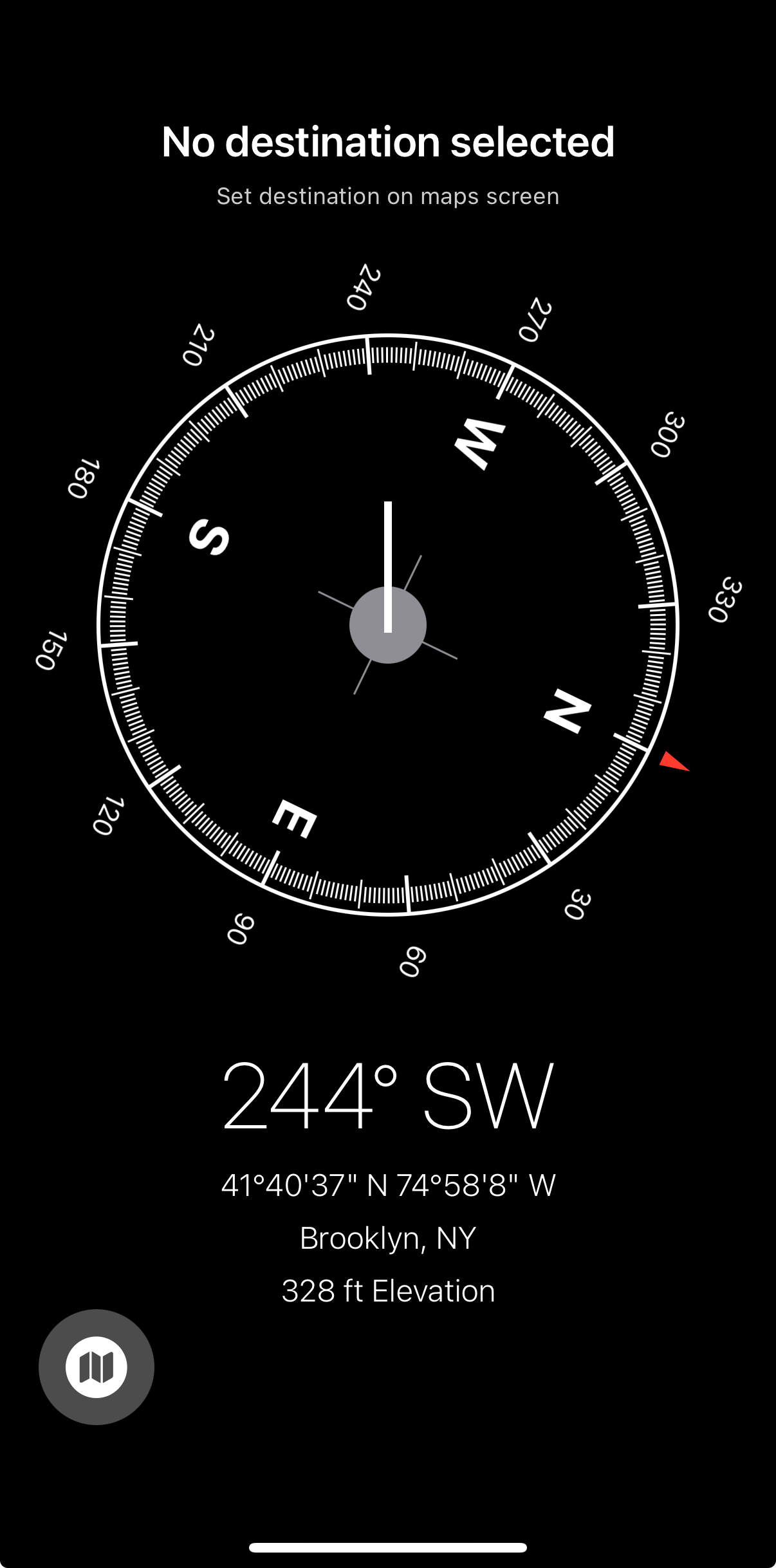
Waypoint is an iOS navigation app that combines the simplicity of a compass interface with destination-based navigation. Instead of traditional turn-by-turn directions, Waypoint shows you a compass with a waypoint indicator pointing toward your destination, giving you a natural, intuitive sense of direction and distance.
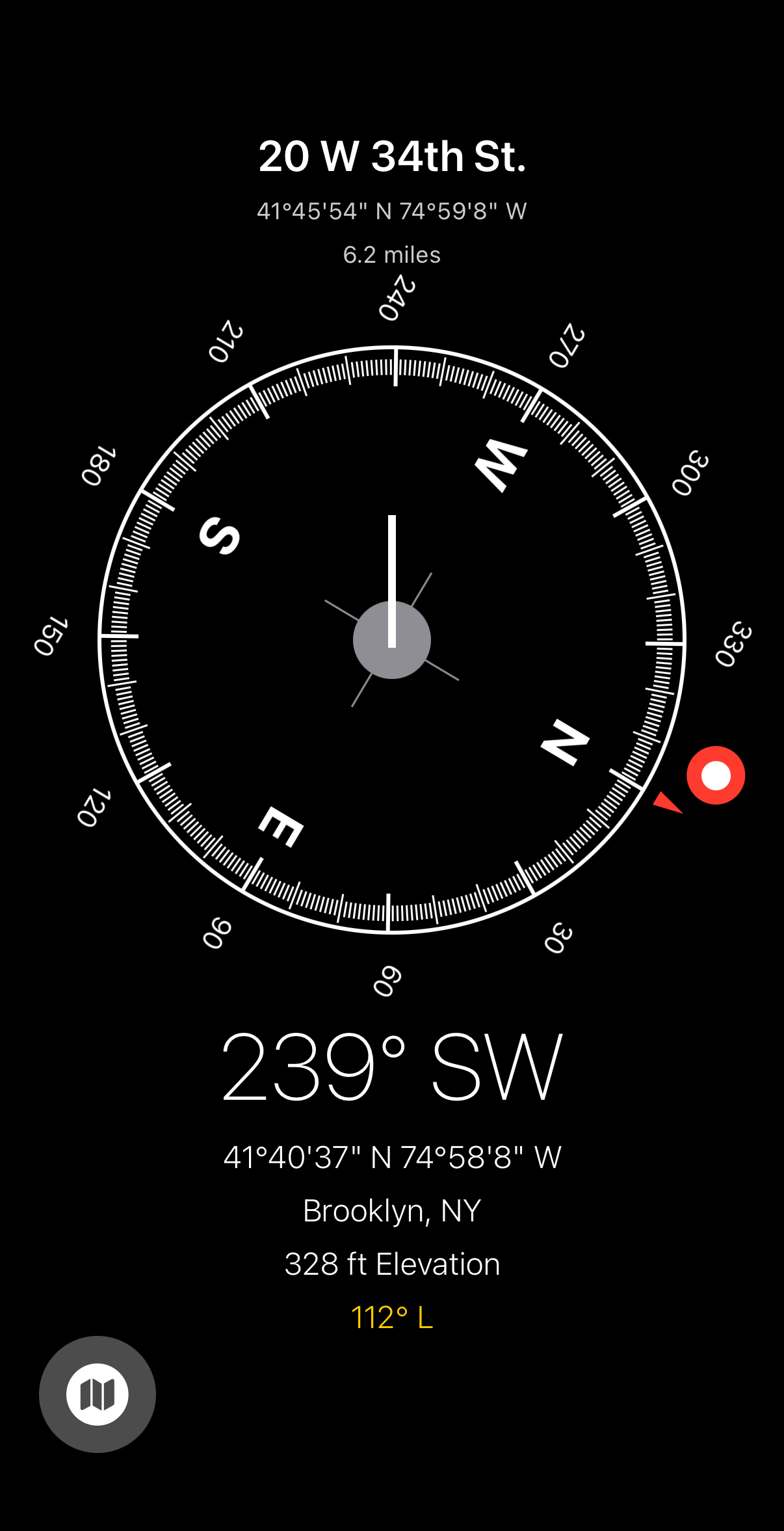
Awaiting approval for release on iOS App Store.
Demo Video
Key Features
- Compass Navigation: Real-time compass view with a waypoint pin showing the direction to your destination
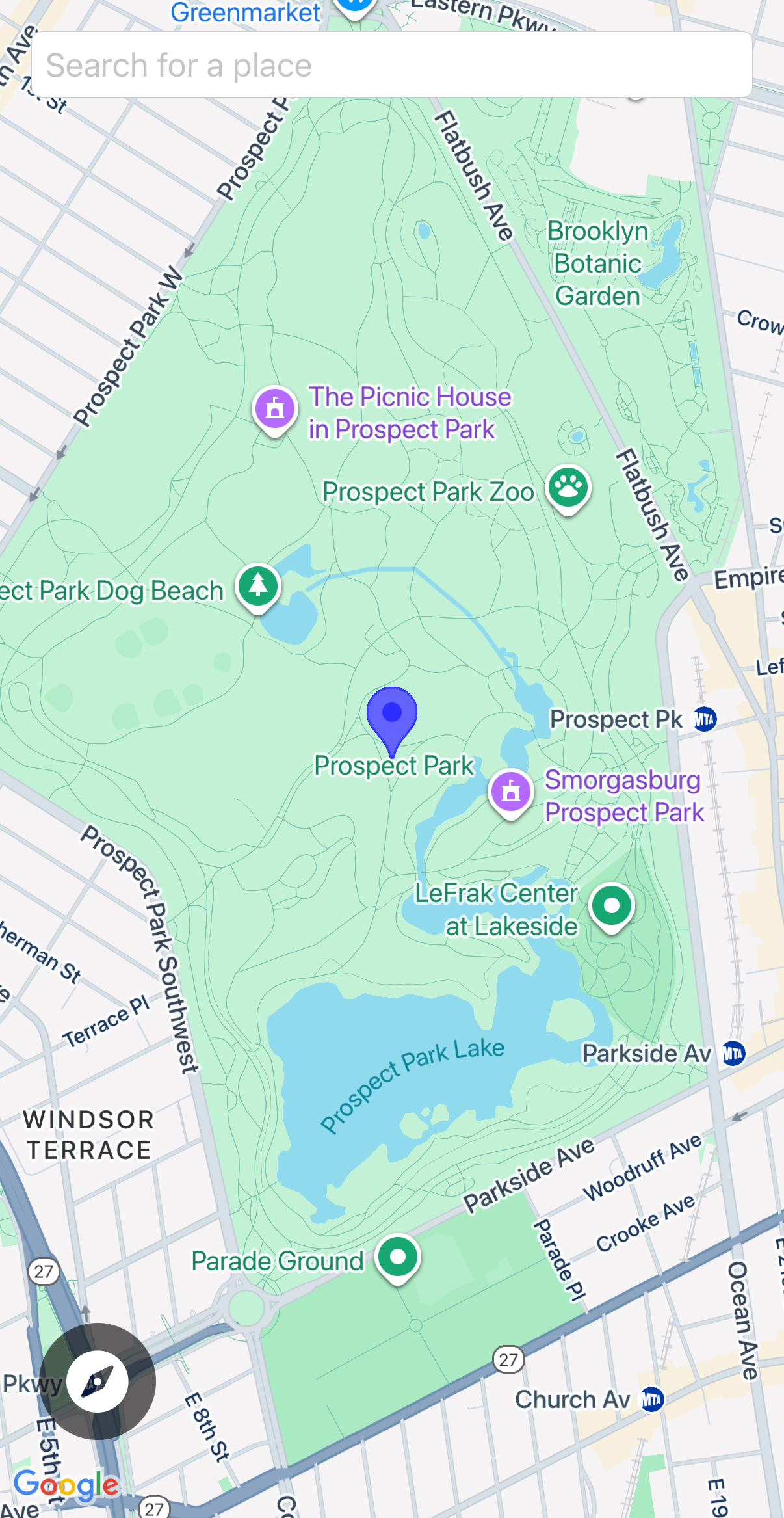
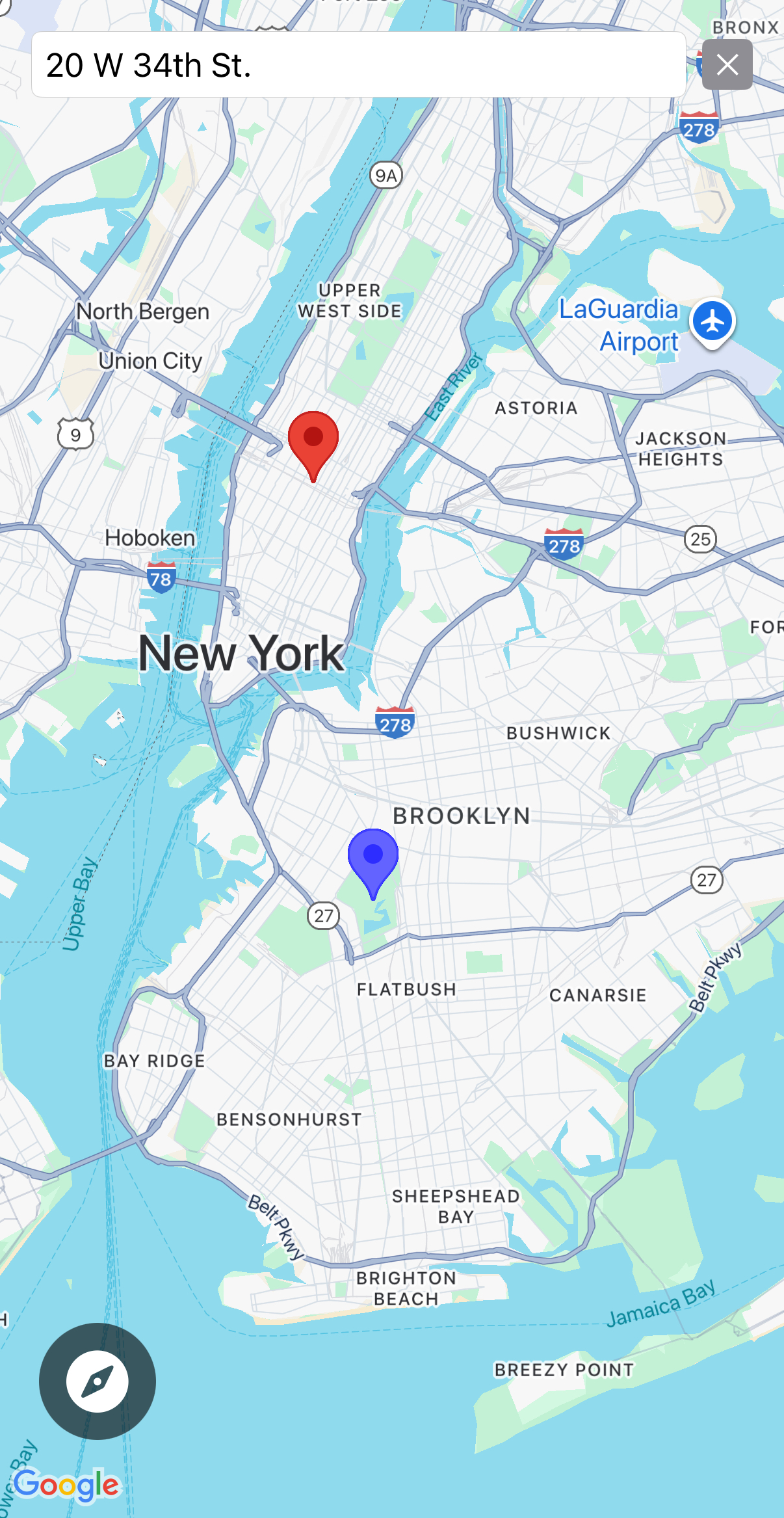
- Map View: Toggle to a traditional Google Maps view showing both your current location and destination
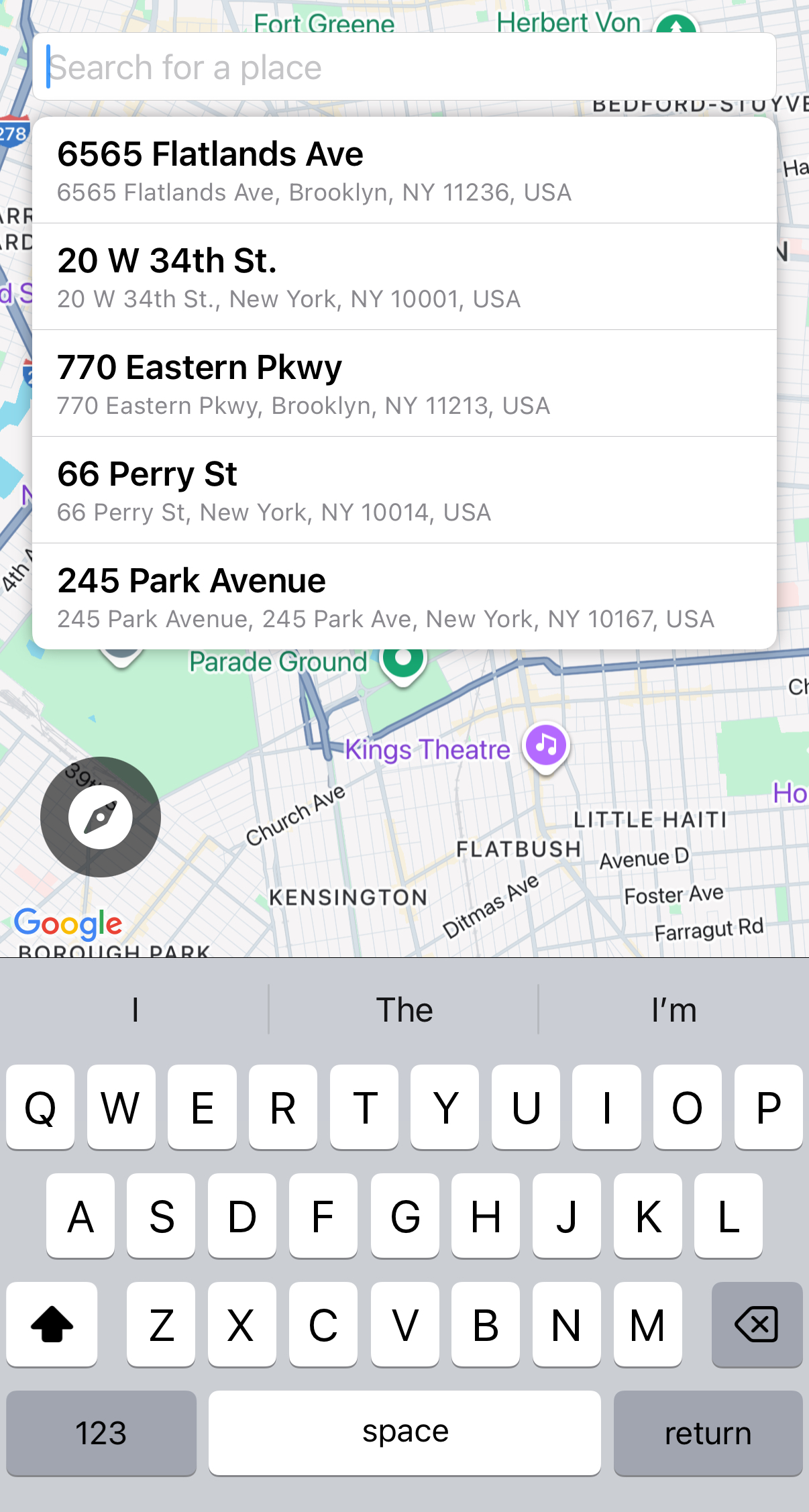
- Smart Search: Google Places autocomplete for finding destinations quickly
- Haptic Feedback: Feel when you’re aligned with your destination (within 20° of target bearing)
- Location Details: Current location info including coordinates, heading, elevation, and address
- Recent Destinations: Quick access to your last 5 searched destinations
How It Works
- Set a destination using the search bar on the map view
- Switch to compass view to see a waypoint indicator showing the direction to your destination
- As you move or rotate your device, the compass updates in real-time
- The waypoint pin rotates around the compass ring to always point toward your destination
- Haptic feedback activates when you’re within 20° of the target bearing
Technical Details
Tech Stack
- SwiftUI: Modern declarative UI framework
- Core Location: GPS positioning, compass heading, and location services
- Google Maps SDK: Interactive map integration
- Google Places API: Autocomplete search and place details
- Core Haptics: Haptic feedback engine
- Combine: Reactive programming for state management
System Architecture
Waypoint follows a clean architecture pattern with clear separation of concerns:
Waypoint/
├── Models/          # Data structures
├── Services/        # Business logic and external APIs
├── Views/           # UI components
└── Utils/           # Reusable utilities
File Structure
Waypoint/
├── WaypointApp.swift          # App entry point, initializes Google Maps SDK
├── Models/
│   ├── CurrentLocation.swift
│   └── Destination.swift
├── Services/
│   ├── LocationManager.swift
│   ├── PlacesService.swift
│   └── HapticService.swift
├── Views/
│   ├── ContentView.swift
│   ├── CompassView.swift
│   ├── MapView.swift
│   └── SearchBar.swift
├── Utils/
│   └── CompassDrawing.swift
├── Config.plist               # Google Maps API key (not in repo)
└── Assets.xcassets/           # App icons and assets
Models
Models are simple data structures that represent the core entities in the app. They contain no business logic—just properties and basic initialization.
CurrentLocation.swift
- Stores current GPS position, compass heading, reverse-geocoded address, and elevation
- Simple data container with no business logic
Destination.swift
- Stores selected destination with address, display name, and coordinates
- Implements
Codablefor persistence (recent destinations) - Extracts display name from full address for cleaner UI
Services
Services contain the business logic and handle interactions with external systems (APIs, device sensors, etc.). They manage state and provide functionality used by the views.
LocationManager.swift
- Central service managing all location-related functionality
- Handles GPS updates, compass heading, and location permissions
- Calculates bearing and distance to destination using spherical trigonometry
- Reverse geocodes coordinates to human-readable addresses
- Manages recent destinations persistence via UserDefaults
- Integrates with
HapticServicefor alignment feedback - Publishes updates via
@Publishedproperties for reactive UI updates
PlacesService.swift
- Manages Google Places API integration
- Handles autocomplete search queries
- Fetches place details and converts to
Destinationobjects
HapticService.swift
- Core Haptics engine for tactile feedback
- Provides intensity-based haptic feedback when within 20° of target bearing
- Intensity increases as alignment improves (stronger feedback when closer to center)
- Manages haptic engine lifecycle and state
Views
Views are SwiftUI components that define the user interface. They observe data from services and models, display information to users, and handle user interactions.
ContentView.swift
- Root view container
- Manages toggle between compass and map views
- Creates and owns the
LocationManagerinstance via@StateObject
CompassView.swift
- Main compass interface
- Displays destination info at top, compass in middle, current location at bottom
- Formats coordinates (degrees/minutes/seconds), distance (miles/meters), and heading direction
- Shows alignment error indicator when destination is set
MapView.swift
- Google Maps integration using
UIViewRepresentable(bridges UIKit to SwiftUI) - Displays current location and destination markers
- Includes search bar overlay for finding destinations
- Manages map camera position and marker updates
SearchBar.swift
- Address search interface with autocomplete dropdown
- Shows Google Places suggestions while typing
- Displays recent destinations when search field is focused but empty
- Handles place selection and updates
LocationManager
Utils
CompassDrawing.swift
- Custom SwiftUI components for compass visualization:
CompassRing: Circular compass with degree markings and cardinal directionsCompassNeedle: Red triangle pointing north, rotates with device headingDestinationPin: Google Maps-style pin showing destination bearingTriangle: Custom shape used for needle and pin graphics
Key Technical Concepts
Navigation Math
- Uses spherical trigonometry (
atan2) to calculate bearing between two GPS coordinates - Bearing calculation accounts for Earth’s curvature for accurate long-distance navigation
- Distance calculated using
CLLocation.distance(from:)and converted to miles
Coordinate Formatting
- Converts decimal degrees to degrees/minutes/seconds format for display
- Handles cardinal directions (N/S/E/W) based on sign
Haptic Feedback Algorithm
- Activates within ±20° zone around target bearing
- Intensity: 0.1 (at boundary) to 1.0 (perfectly aligned)
- Sharpness: 0.8 (at boundary) to 0.0 (at center)
- Provides immediate feedback on each alignment update
State Management
- Uses SwiftUI’s reactive data flow with
@Published,@StateObject, and@ObservedObject LocationManageris the single source of truth for location and destination state- Services publish updates that automatically trigger UI refreshes
State Variables and Storage
LocationManager (Session State - @Published)
currentLocation: Current GPS position, heading, address, and elevationdestination: Selected destination for navigationsearchText: Current search bar input textisSearchBarFocused: Whether the search bar is currently focusedrecentDestinations: Array of last 5 searched destinationsbearingToDestination: Calculated bearing angle to destination (0-360°)distanceToDestination: Distance to destination in milesalignmentError: Signed alignment error (+ = right of target, - = left)
LocationManager (Session State - Non-Published)
savedMapCamera: Saved map camera position (lat, lng, zoom) for restoring map view state- Persists across view recreations when switching between compass and map views
- Saved continuously as user pans/zooms the map via
GMSMapViewDelegate
LocationManager (Persistent State - UserDefaults)
recentDestinations: Saved to UserDefaults as JSON- Automatically saved via
didSetwhen array changes - Loaded on app startup in
init() - Key:
"recentDestinations"
PlacesService (Session State)
searchResults: Array of Google Places autocomplete predictions
View-Level State (@State)
ContentView.showingMapView: Boolean flag for compass/map view toggleMapView.GoogleMapView.mapView: Reference to the GMSMapView instanceMapView.GoogleMapView.hasSetInitialCamera: Flag to prevent overwriting saved cameraSearchBar.isSearching: Whether user is actively searchingSearchBar.isTextFieldFocused: TextField focus state
Persistence Strategy
- Persistent (survives app restarts): Recent destinations → UserDefaults
- Session (survives view recreation): Map camera, navigation state → LocationManager properties
- Local (view lifecycle): UI state, temporary flags →
@Statein views
Configuration
The app requires a Google Maps API key stored in Config.plist:
<key>GMSApiKey</key>
<string>YOUR_API_KEY_HERE</string>
This key is used for both Google Maps and Google Places services.
Permissions
The app requires the following iOS permissions:
- Location Services (When In Use): For GPS positioning and compass heading
Development Notes
Architecture Principles
- Separation of Concerns: Models hold data, Services handle logic, Views display UI
- Single Source of Truth:
LocationManagermanages all location-related state - Reactive Updates: SwiftUI automatically updates UI when
@Publishedproperties change - Minimal Dependencies: Core iOS frameworks + Google Maps SDK only
Future Enhancements
Potential areas for expansion:
- Path-tracking and storing, to see your travels in hindsight
- Pulses on waypoint placement for enhanced immersion and synchronization between digital map, hapto-visual feedback, and real-world placement